
❓ FAQ Management – Sitegenix.io
Create and manage a comprehensive FAQ section to improve customer experience and reduce support inquiries.
Overview
The FAQ (Frequently Asked Questions) section in Sitegenix.io is designed to help Super Admins or Users create a knowledge base that improves customer understanding and enhances user experience. By adding commonly asked questions and their answers, you can reduce support tickets and ensure users get instant help.
🔍 Accessing the FAQ Section
- Login to your Super Admin Dashboard.
- In the left-hand sidebar, click on the "FAQ" tab.
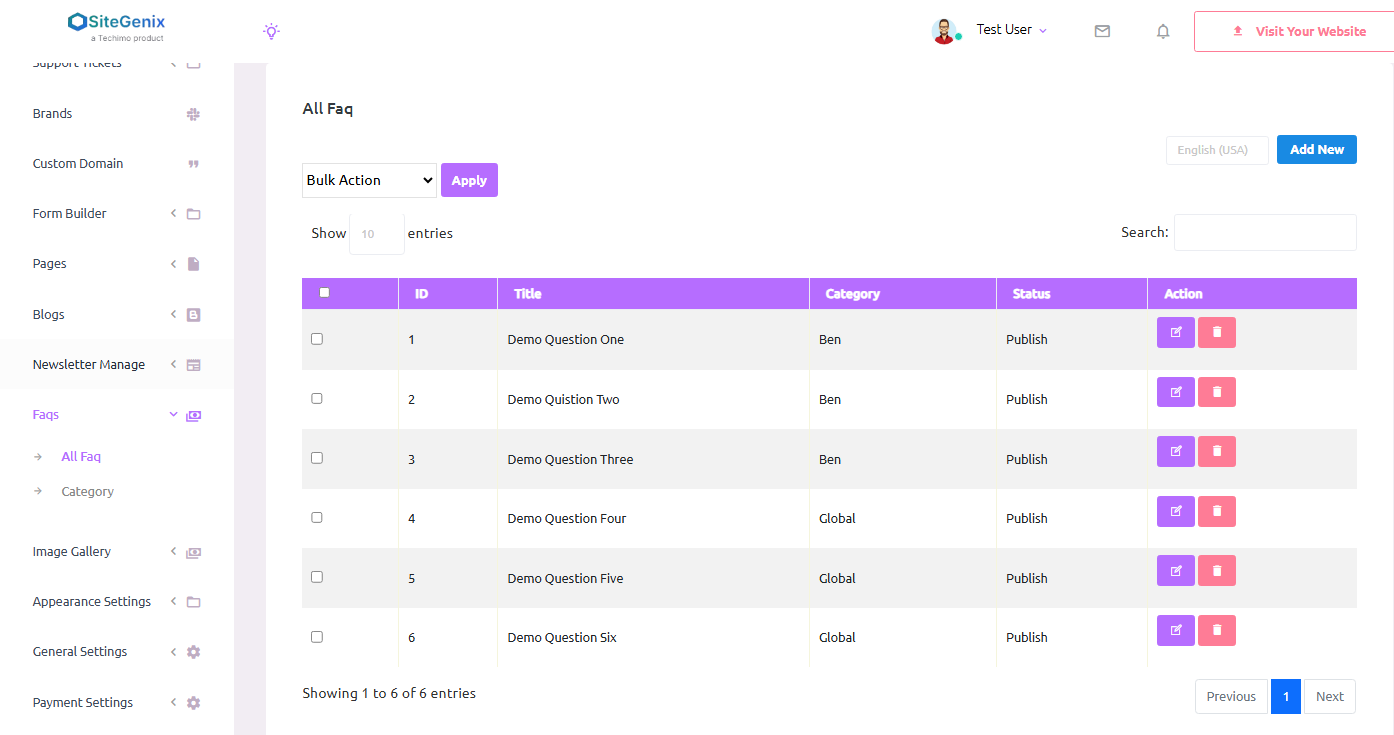
- This will take you to the FAQ management interface where you can view, create, and manage FAQs and their categories.
🆕 Creating a New FAQ
To create a new FAQ item:
- Click on "Add New FAQ".
- Enter the required details:
- Question: Type the frequently asked question.
- Answer: Provide a clear and detailed answer to the question.
- Category: Select an existing category or create a new one to organize your FAQs better.
- Click Save to publish the FAQ.
🗂 Categorizing FAQs makes it easier for users to navigate and find the answers they need.
🗃️ Managing FAQ Categories
- From the FAQ section, navigate to the "Categories" tab.
- Click on "Add New Category" to create categories like:
- General
- Billing
- Technical Support
- Product Features
- Categories can be edited or deleted as needed.
Using categories keeps your FAQs organized and allows for better structuring on the front end.
✏️ Editing and 🗑️ Deleting FAQs
- Edit: Use the edit icon next to an FAQ to modify the question, answer, or category.
- Delete: Click the delete icon to remove an outdated or unnecessary FAQ.
✅ It's recommended to keep your FAQs updated regularly based on customer feedback and queries.
🌐 Frontend Display
Once created, FAQs are automatically displayed on the website in the FAQ section, categorized neatly for users to browse. This section is often found under Support, Help Center, or About Us pages, and can be added using widgets or page builder blocks.
✅ Key Benefits
- Helps customers find answers without contacting support.
- Improves overall user experience and trust.
- Reduces support workload for the admin team.
- Fully categorized and searchable content.
- Editable and updatable anytime.
Conclusion
The FAQ Management system in Sitegenix.io is a powerful tool for educating users, clarifying doubts, and reducing customer service inquiries. With an easy-to-use interface and full customization, it plays a key role in customer satisfaction and site professionalism.