
Third-Party Scripts – Sitegenix.io
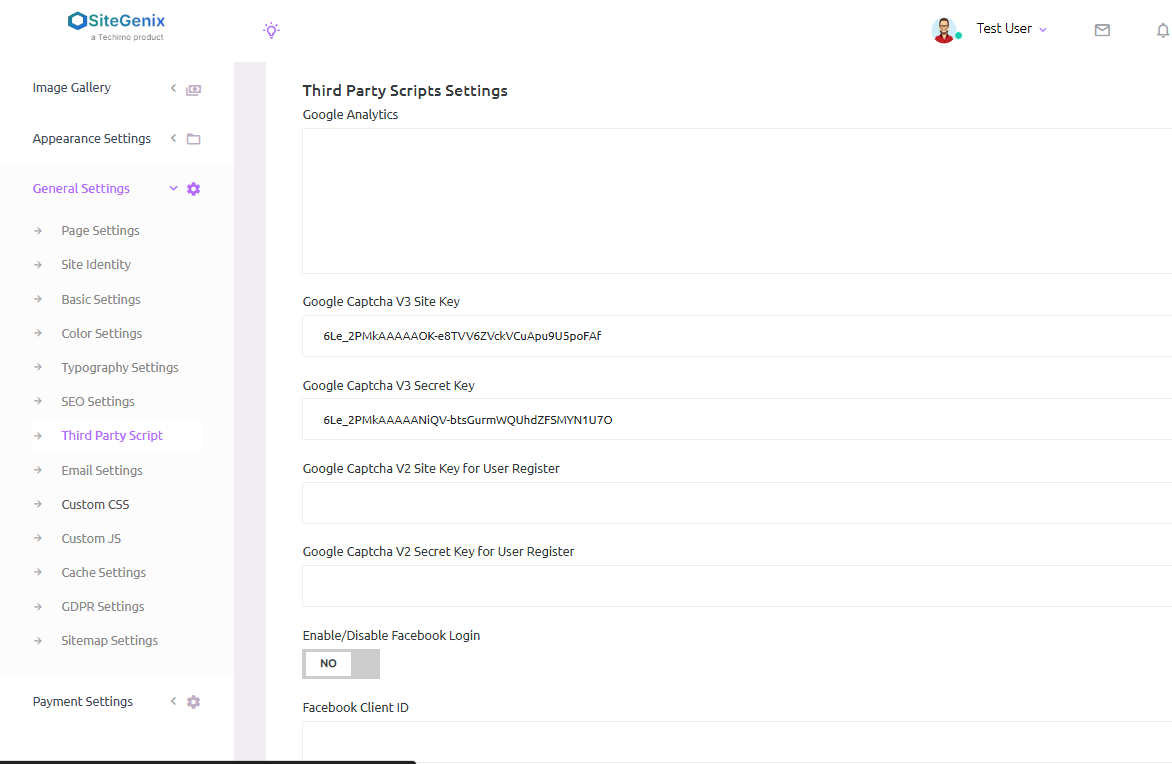
Overview
Sitegenix.io allows Super Admins to integrate essential third-party tools and services into the website via Third-Party Scripts. This includes integration with services such as Google Analytics, Google reCAPTCHA, Google Social Login, Facebook Login, and Google AdSense. These integrations help with tracking, security, user authentication, and monetization.
Steps to Add Third-Party Scripts:
Access Third-Party Scripts Settings:
In the Super Admin Dashboard, navigate to the sidebar menu.
Click on "General Settings" to expand the settings options.
Select "Third-Party Scripts" from the available options.
Add Google Analytics:
In the Third-Party Scripts section, you will find a field to add the Google Analytics Tracking ID.
Enter your Google Analytics tracking code (e.g., UA-XXXXXXXXX-X) into the provided field.
This allows Google Analytics to track and analyze your site's traffic and user behavior.
Add Google reCAPTCHA:
You will find fields for Google reCAPTCHA integration. To add reCAPTCHA, you need the Site Key and Secret Key.
These keys can be obtained from the Google reCAPTCHA Console.
Paste the Site Key and Secret Key into their respective fields to protect your forms and prevent bots from submitting.
Add Google Social Login (Client ID and Secret ID):
For Google Social Login, there are fields to enter your Google OAuth Client ID and Google OAuth Client Secret.
These credentials can be obtained from the Google Developer Console.
Once entered, users will be able to log in using their Google account for a seamless authentication process.
Add Facebook Social Login (Client ID and Secret ID):
Similar to Google, you can add Facebook Login integration by entering the Facebook App ID and Facebook App Secret.
These credentials can be obtained from the Facebook Developer Portal.
With these credentials, users can log in using their Facebook account.
Add Google AdSense:
To monetize your website, you can integrate Google AdSense.
There will be a field for the Google AdSense Publisher ID or AdSense Script.
Enter the AdSense code into the provided field to display ads on your site and generate revenue.
Save Changes:
After adding the necessary information for each third-party service (Google Analytics, reCAPTCHA, Social Logins, Google AdSense), make sure to click "Save Changes" to apply the integrations.
Benefits:
Google Analytics Integration: Track user behavior, traffic, conversions, and generate detailed reports about your website's performance.
Google reCAPTCHA: Protect forms from spam and malicious bot submissions.
Google & Facebook Social Logins: Allow users to log in using their Google or Facebook credentials for a smooth and quick authentication process.
Google AdSense: Monetize your website by displaying ads and earning revenue from clicks and impressions.