
Navigation Menu Management – Sitegenix.io
Overview
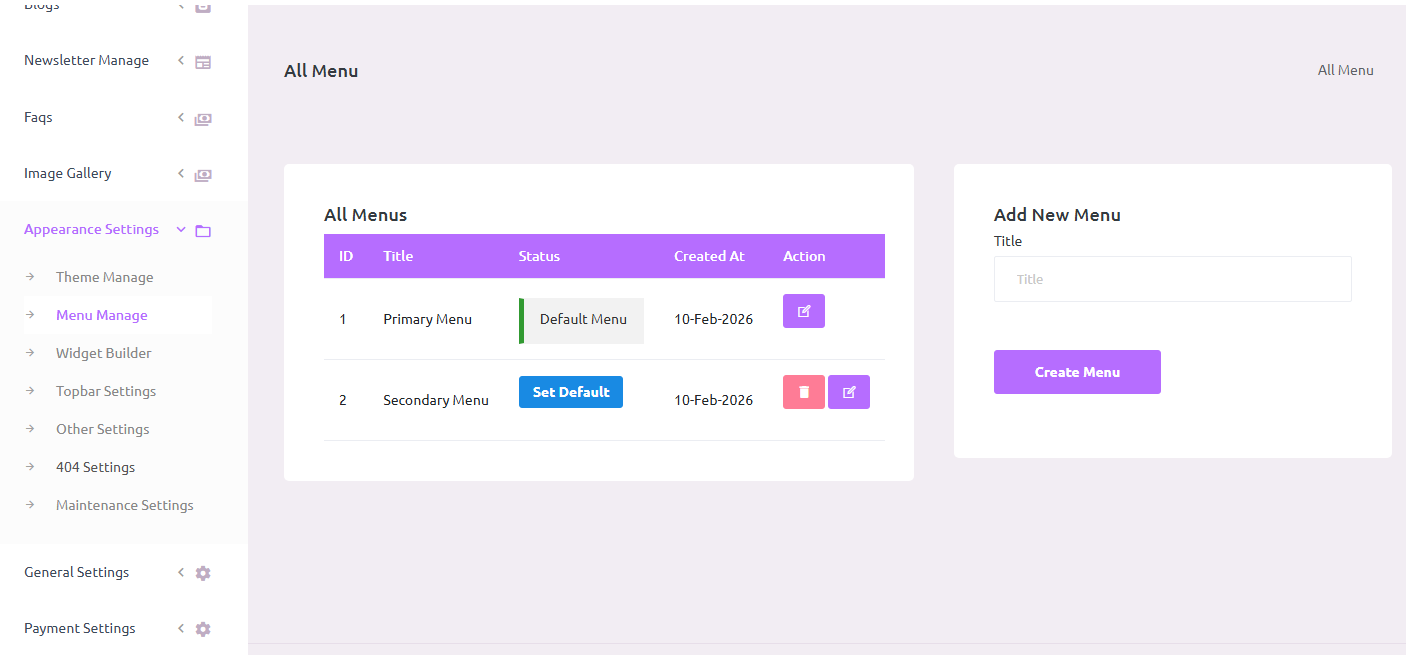
Sitegenix.io offers complete control over website navigation through its Menu Management System, accessible from the Super Admin Dashboard. This feature allows users to create, customize, and manage navigation menus to suit the layout and structure of their website.
Steps to Manage Navigation Menus:
Access Menu Management Panel
From the Super Admin Dashboard, go to the left-hand sidebar.
Click on "Appearance Settings" to expand the available options.
Then click on "Manage Menus" to open the menu management interface.
Create a New Navigation Menu
Click on the "Create New Menu" button.
Enter a menu name (e.g., Main Menu, Footer Menu).
Define the menu location (e.g., Header, Footer, Sidebar).
Add menu items (links) such as pages, posts, custom URLs, categories, or external links.
Arrange the items using the drag-and-drop functionality to set the desired order.
Click "Save Menu" to apply the changes.
Edit Existing Menus
Select any existing menu from the list.
You can:
Rename the menu.
Add new links (pages, custom links, posts).
Edit menu item names or URLs.
Reorder items using drag-and-drop.
Remove links that are no longer needed.
Once done, click "Update Menu" to save changes.
Menu Link Options
Each menu item allows you to:
Set a custom label for the navigation.
Add icons or dropdowns if supported by your theme.
Assign sub-menus for multi-level navigation.
Multi-Location Support
Users can create multiple menus for different areas of the site (e.g., top bar, main navigation, footer).
Each menu can be assigned to a specific display location based on the selected theme.
Benefits:
Full Control: Customize site navigation to match your content structure.
User-Friendly: Drag-and-drop interface makes it easy to manage links and menus.
Dynamic Updates: Menus can be updated at any time without affecting the live site instantly.
Notes:
- Always preview menu changes before publishing, especially if multiple menus are used across the site.
- Ensure important pages (like Home, About, Contact) are always visible in the main navigation.
- Use dropdowns for categories or grouped links to keep menus clean and user-friendly.