
Payment Settings – Sitegenix.io
Overview
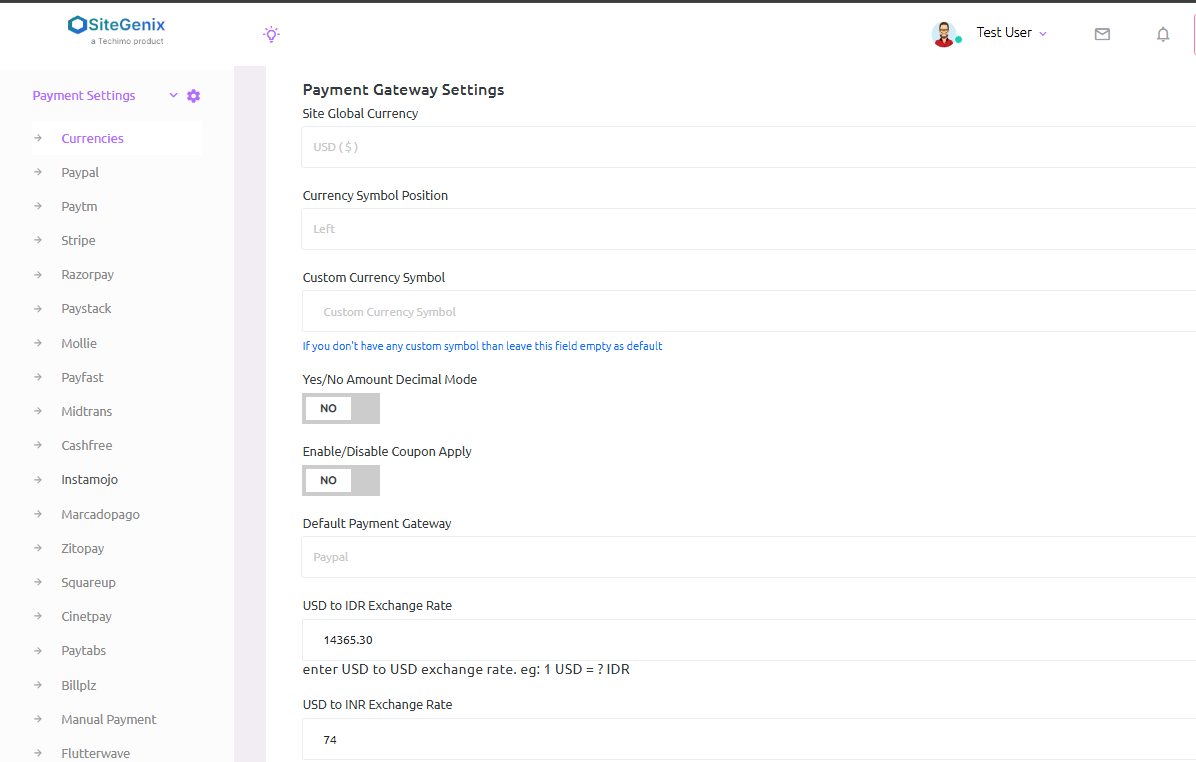
Sitegenix.io provides integration with 20+ popular payment gateways such as PayPal, Stripe, Razorpay, and many others. From the Super Admin Dashboard, users can configure and activate their preferred payment gateways by adding the necessary API credentials.
Steps to Configure Payment Gateways:
Accessing the Payment Settings:
Login to your Super Admin Dashboard.
From the left-hand sidebar, click on "Payment Settings".
You will see a list of available payment gateways supported by Sitegenix.
Select a Payment Gateway:
Browse through the available gateways such as Stripe, PayPal, Razorpay, etc.
Click on the gateway you want to configure.
Enable the Payment Gateway:
Toggle the Enable/Disable switch to activate the selected payment gateway.
Once enabled, additional fields will appear where you need to enter the required API credentials.
Add Payment Gateway Credentials:
Each payment provider requires specific API keys or authentication details to function.
For example:
Stripe:
You need to enter:
- Publishable Key
- Secret Key
PayPal:
Enter:
- Client ID
- Client Secret
Razorpay:
Enter:
- Key ID
- Key Secret
These credentials can be generated from your respective payment provider's dashboard.
Save Changes:
After filling in the required fields, click the "Save" button to apply the configuration.
The payment gateway is now active and can be used for processing payments on your site.
Key Features:
Supports 20+ Payment Gateways: Including Stripe, PayPal, Razorpay, Paystack, Flutterwave, etc.
Secure Integration: Only API credentials are required. All transactions happen securely through the gateway's platform.
Simple Activation: One-click enable and key entry to start using any gateway.
Flexible Payment Options: Supports multiple currencies and regional payment systems depending on the gateway used.
Best Practices:
- Always use test mode/sandbox credentials first to verify the integration works before switching to live credentials.
- Keep your API keys and secrets secure and never share them publicly or include them in client-side code.
- Regularly check for updates from your payment providers as they may update their API requirements over time.
- Consider offering multiple payment options to accommodate different customer preferences and regional availability.