
Custom Form Builder – Sitegenix.io
Overview
Sitegenix.io includes a powerful Custom Form Builder that allows users to create, edit, and manage all types of forms directly from the Super Admin Dashboard. Whether it's a contact form, feedback form, registration form, or custom data collection form – everything can be built visually with no coding required.
Steps to Create and Manage Forms:
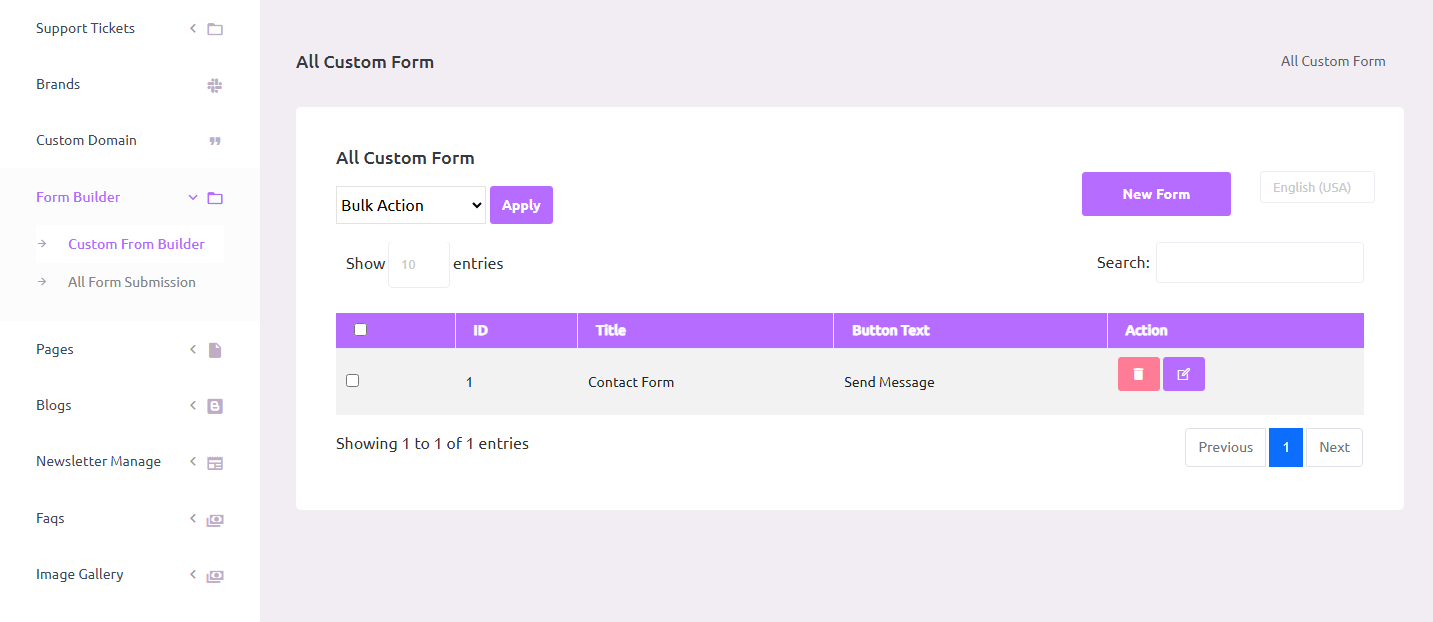
Access the Form Builder Tool
In the Super Admin Dashboard, navigate to the sidebar menu.
Click on "Form Builder", then select "Custom Form Builder".
Create a New Form
Click on the "Create New Form" button.
Enter a form name (e.g., Contact Form, Registration Form).
Use the drag-and-drop interface to add form fields such as:
Name
Phone
Message box
Dropdowns
Checkboxes
File upload, etc.
Customize field labels, validation rules, placeholder texts, and required settings.
Once the form is ready, click "Save" to create it.
Edit or Delete Existing Forms
From the Form Builder tab, a list of all created forms is displayed.
Use the Edit option to make changes to any existing form.
Use the Delete option to permanently remove a form that's no longer needed.
Form Submission Management
Below the Form Builder section, click on the "All Form Submissions" tab.
This section shows all entries submitted through each form.
Users can:
View submission details
Filter submissions by form
Export data if required for reporting or follow-up
Benefits:
No Coding Needed: Easy drag-and-drop interface to build any kind of form.
Flexible Fields: Support for a variety of input types and validation rules.
Centralized Submissions: All entries stored in one place for review and download.
Edit Anytime: Forms can be updated or deleted with a few clicks.