
Blogs Management
Learn how to create and manage blog content on your SiteGenix website.
Overview
The Blogs Management module in SiteGenix provides a comprehensive solution for creating, publishing, and managing blog content on your website. Blogging is an excellent way to share your expertise, engage with your audience, and improve your website's search engine visibility.
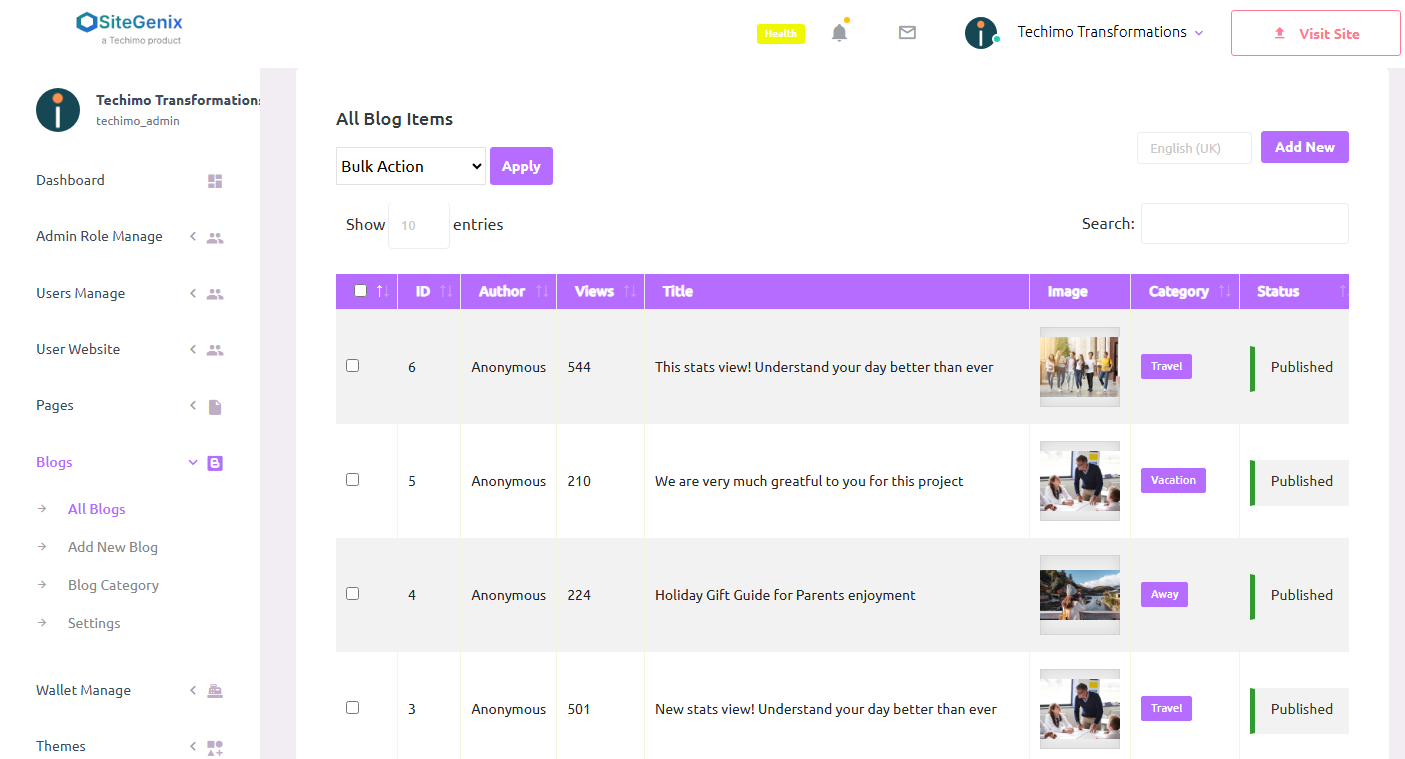
With SiteGenix's blog management tools, you can create engaging content with rich formatting, categorize posts, add tags, schedule publication, and track reader engagement—all from a user-friendly interface.
Key Features
Rich Text Editor
Create beautifully formatted content with our intuitive WYSIWYG editor.
Categories & Tags
Organize your content with categories and tags for better navigation and SEO.
Featured Images
Add eye-catching featured images to make your posts stand out.
Scheduled Publishing
Schedule posts to publish automatically at your preferred date and time.
Comments Management
Engage with your readers through a robust comment system with moderation tools.
SEO Tools
Optimize your blog posts for search engines with built-in SEO tools.
Social Sharing
Make it easy for readers to share your content on social media platforms.
Analytics Integration
Track post performance with detailed analytics on views, engagement, and more.
Creating Blog Posts
Follow these steps to create a new blog post in SiteGenix:
- Log in to your SiteGenix dashboard
- Navigate to "Advanced Tools" in the main menu
- Select "Blogs Management" from the dropdown menu
- Click "Add New Post" to create a new blog entry
- Enter a title for your blog post
- Use the rich text editor to write and format your content
- Add a featured image by clicking the "Set Featured Image" button
- Select categories and add tags for your post
- Configure additional settings:
- Excerpt (short summary of your post)
- SEO settings (meta title, description, keywords)
- Discussion settings (enable/disable comments)
- Publication date (publish immediately or schedule)
- Click "Publish" to make your post live, or "Save Draft" to continue editing later
Managing Blog Categories
Categories help organize your blog content into logical sections. To create and manage blog categories:
- Go to the Blogs Management section in your dashboard
- Click on the "Categories" tab
- Click "Add New Category"
- Enter a name for the category
- Add a description (optional but recommended for SEO)
- Select a parent category if applicable (for creating subcategories)
- Click "Save" to create the category
You can edit or delete categories at any time. When you delete a category, posts in that category are not deleted but become uncategorized.
Using Tags
Tags provide another way to organize and connect related content. Unlike categories, tags are typically more specific and can be used across different categories. To add tags to your blog posts:
- When creating or editing a post, locate the "Tags" section
- Enter tags separated by commas
- Click "Add" to apply the tags to your post
You can also manage all your tags from the "Tags" tab in the Blogs Management section. This allows you to edit, delete, or merge tags as needed.
Blog Layout and Display Options
SiteGenix offers various options for how your blog is displayed on your website. To customize your blog layout:
- Go to the Blogs Management section in your dashboard
- Click on the "Settings" tab
- Configure your preferred display options:
- Blog page layout (grid, list, masonry, etc.)
- Posts per page
- Excerpt length
- Featured image size and position
- Show/hide post metadata (author, date, categories, etc.)
- Sidebar configuration (widgets to display)
- Click "Save Changes" to apply your settings
Comments Management
Engaging with your readers through comments is an important part of blogging. SiteGenix provides tools to manage comments effectively:
- Comment moderation: Choose whether comments are published automatically or require approval.
- Spam filtering: Automatic filtering of spam comments to keep your blog clean.
- Notifications: Receive email notifications when new comments are posted.
- Replies: Respond to comments directly from your dashboard.
- User profiles: Commenters can create profiles with avatars for a more personalized experience.
To manage comments, go to the "Comments" tab in the Blogs Management section. From there, you can approve, reply to, edit, or delete comments.
SEO for Blog Posts
Optimizing your blog posts for search engines can help increase your visibility and attract more readers. SiteGenix includes several SEO tools specifically for blog content:
- Meta titles and descriptions: Customize how your post appears in search results.
- Focus keyword analysis: Get feedback on how well your content is optimized for your target keyword.
- Readability analysis: Ensure your content is easy to read and understand.
- Internal linking suggestions: Find opportunities to link to other content on your site.
- XML sitemaps: Automatically generated and updated to help search engines index your content.
- Structured data: Add schema markup to help search engines understand your content better.
To access these SEO tools, look for the "SEO" section when creating or editing a blog post.
Best Practices
Follow these best practices to create a successful blog that engages readers and supports your website goals:
- Consistent publishing: Establish a regular posting schedule to keep your audience engaged.
- Quality over quantity: Focus on creating valuable, well-researched content rather than posting frequently with lower quality.
- Visual elements: Include images, videos, or infographics to make your posts more engaging.
- Clear formatting: Use headings, bullet points, and short paragraphs to make your content easy to scan.
- Call to action: Include a relevant call to action at the end of each post.
- Engage with comments: Respond to reader comments to build community and encourage discussion.
- Promote your content: Share your blog posts on social media and in your email newsletter.
- Monitor performance: Use analytics to understand which topics resonate with your audience.