
SEO Settings – Sitegenix.io
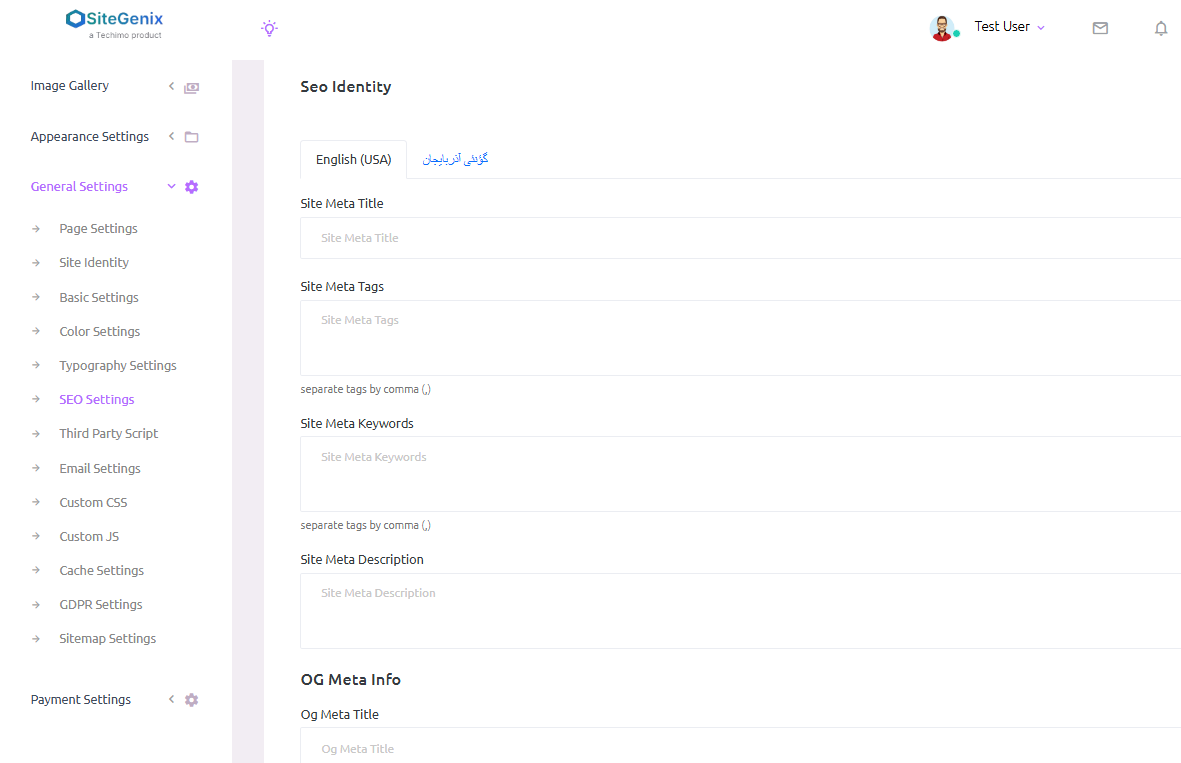
Overview
Sitegenix.io provides a comprehensive SEO (Search Engine Optimization) Management System that allows Super Admins to optimize their website for search engines. Users can add specific SEO information for individual pages and global SEO settings for the entire site, including meta titles, meta descriptions, keywords, and more.
Adding SEO for Individual Pages:
Access Page SEO Settings:
Go to the Super Admin Dashboard.
Navigate to the Pages section where you manage individual content pages.
For each page, you'll find an option to add SEO Metadata.
Add SEO Information for Specific Pages:
On the page editing screen, locate the SEO Settings section.
Enter the Meta Title for the page. This is the title that will appear on search engine results and browser tabs.
Add the Meta Description. This should be a brief summary (160-320 characters) that describes the content of the page and encourages users to click on the result in search engines.
The Meta Title and Meta Description should be carefully crafted to include relevant keywords and provide a clear overview of the page's content.
Global SEO Settings:
Access Global SEO Settings:
In the Super Admin Dashboard, navigate to the sidebar.
Click on "General Settings" and then select "SEO Settings".
Configure Site-Wide SEO Settings:
In the SEO Settings section, users can configure the global SEO settings for the entire website. These settings apply to all pages, posts, and content on the site unless overridden at the page level.
SEO Configuration Options:
Site Meta Title: Enter a site-wide meta title that will be used across the site for search engine results. This should reflect the primary purpose of the website or brand.
Meta Tags: Add relevant meta tags that describe the overall site's content and focus areas.
Meta Keywords: Enter a list of keywords related to the site's content. These keywords help search engines understand the site's focus and improve its visibility in relevant searches.
Site Meta Description: Provide a short description (160-320 characters) that captures the essence of the website. This description will appear in search engine results under the title.
Save Changes:
Once the desired SEO configurations are set, click "Save Changes" to apply the new settings globally.
Benefits:
Improved Search Engine Visibility: By adding meta titles, descriptions, and keywords, you can enhance the website's presence in search engine results, increasing organic traffic.
Custom SEO Per Page: You have the flexibility to add SEO information for individual pages, allowing specific optimization for different content types.
Site-Wide SEO Control: Manage and customize global SEO settings, making it easier to set consistent SEO parameters across the entire website.
Boost SEO Performance: By properly optimizing both individual pages and site-wide settings, you can improve the site's overall SEO ranking, leading to better search engine visibility.
Notes:
- Meta Title & Meta Description Length: Ensure that meta titles are under 60 characters and meta descriptions are under 160 characters to ensure they display properly in search results.
- Keyword Relevance: Use relevant and targeted keywords that accurately describe the page or site content. Avoid keyword stuffing, as this can negatively impact SEO.
- Regular Updates: SEO settings should be periodically updated as content evolves, and new keywords or search trends emerge.