
2. Purchasing a Plan and Credits
Step 1: Visit the Pricing Page
On the dashboard or homepage, navigate to the Pricing Plans section.
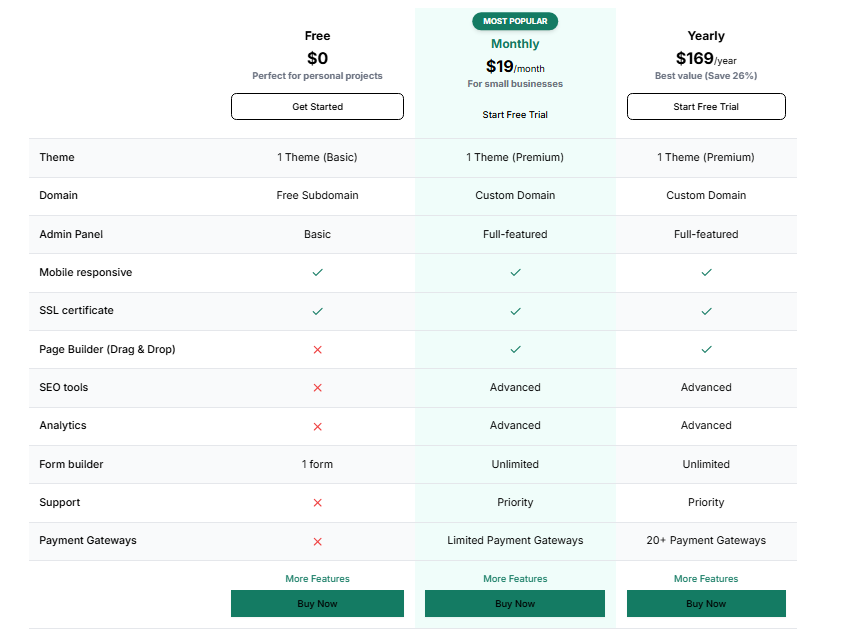
Step 2: Choose a Plan
Review the available plans and click on the "Buy" button associated with your preferred plan.
Step 3: Enter Subdomain
You will be prompted to choose a subdomain for your website. Example:
test.sitegenix.io
This will be the live address of your new website.
Step 4: Select a Theme
Choose from available website templates/themes based on your website type:
E-commerce, Portfolio, Blog, Agency, etc.
Example: If you choose the E-commerce Theme, your site will be structured accordingly.
Step 5: Choose a Payment Method
Select from the available payment gateways (Credit/Debit Cards, UPI, PayPal, etc.).
Step 6: Proceed to Payment
Complete the transaction securely.
Step 7: Website Deployment
After a successful payment:
Your selected theme will be deployed to the specified subdomain.
For instance, if the subdomain entered was test.sitegenix.io and the theme selected was E-commerce, then:
The URL https://test.sitegenix.io will now display your E-commerce site.